
Europe & UK eSIM 42 Countries | Bouygues
iPhone detected. Select your model. (Scroll to find yours)
Where was this phone purchased? Check Settings › General › About › Model Number.
Can't find your phone? Contact us before ordering.
- Dial *#06# and confirm your device shows an EID number.
- Your device must be carrier / network unlocked.
- Your device must not be jailbroken (iOS) or rooted (Android).
- Some regional models may not support eSIM even if the same phone name does.




Description
What’s Included?
- Options of:
- 30GB
- 60GB + €25 call credit (e.g. can call to Australia)
- Unlimited calls within Europe
- 4G/LTE speed
- 15 – 30 days service from activation
- For use in select European countries & the UK
- Hotspot/Tethering enabled
- How do eSIMs work? Check our eSIM setup guide
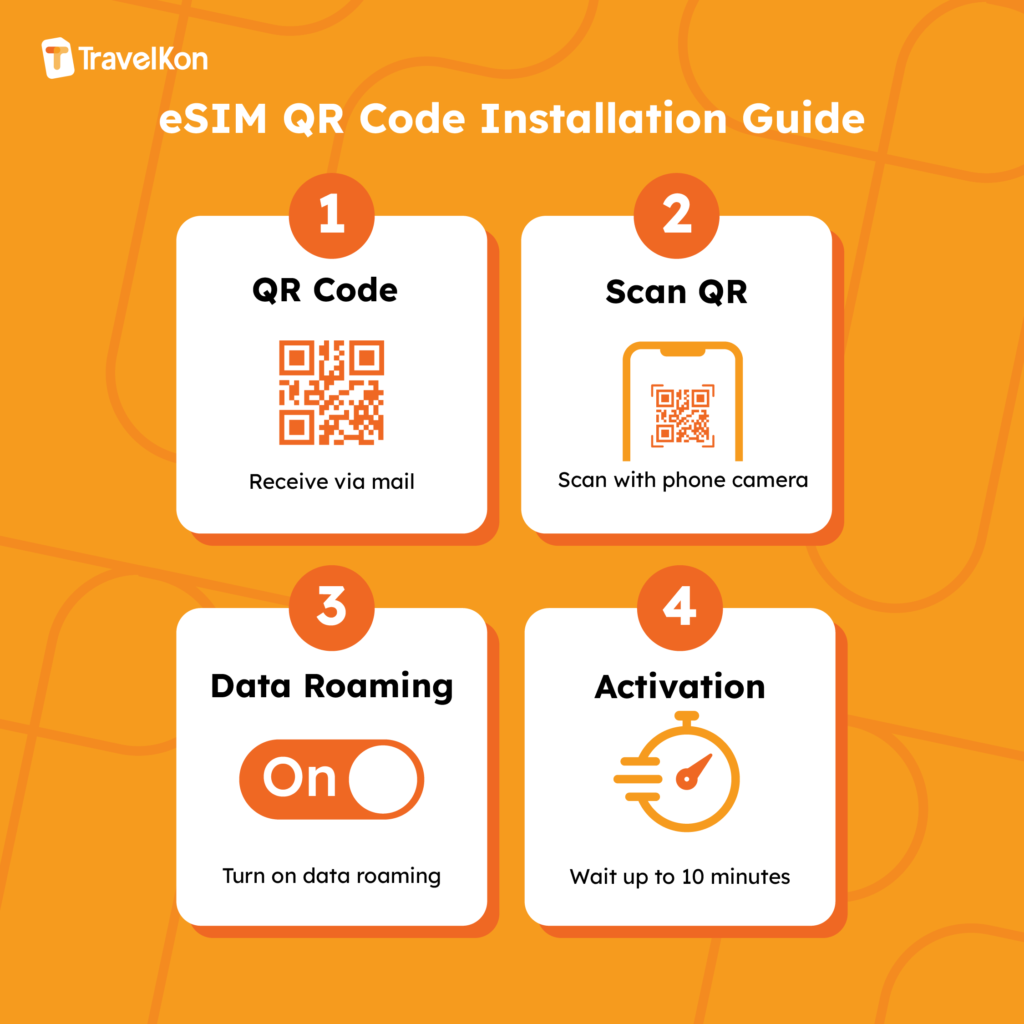
- Purchase your eSIM plan, QR code will be sent instantly via email
- Scan the QR code to add the eSIM to your eSIM compatible phone
- Turn on data roaming to use the eSIM
- eSIM must connect to supported network and be used within 90 days of purchase
Thing’s to know
- Local Bouygues French eSIM provider (all text from the network will be in French)
- Comes with a French phone number (+33)
- Plan starts when eSIM connects to supported network
- No ID registration needed
- Text is not included
- Compatible with unlocked eSIM-enabled phones (with EID numbers)
- Check data usage by texting “conso” to 680 or by calling 634 to speak to customer support agents. If this method does not work use mobile phone settings to check data usage.
- List of countries where data is included:
- European Union (27 countries)
Austria, Belgium, Bulgaria, Croatia, Cyprus, Czech Republic, Denmark, Estonia, Finland, France, Germany, Greece, Hungary, Ireland, Italy, Latvia, Lithuania, Luxembourg, Malta, Netherlands, Poland, Portugal, Romania, Slovakia, Slovenia, Spain, Sweden - Others (17 Destinations):
Aland Islands, Andorra, Azores, Balearic Islands, Canary Island, Faroe Islands, Gibraltar, Guernsey, Jersey, Liechtenstein, Madeira, Norway, Iceland, Isle of Man, United Kingdom, Vatican City and Isle of Wight
- European Union (27 countries)
Important Notes
- Adding the eSIM outside the coverage country may result in a “failed activation,” which is normal. The eSIM will activate once you reach your destination.
- Turn off the eSIM line and do not turn on data roaming until you reach your destination.
- Haven’t received your eSIM? Check your junk mail or reach out to us
- Ignore any text messages asking for ID registration as this is NOT required
- Make your purchase carefully as no refunds will be provided once the eSIM is sent
Troubleshooting Guide
eSIM not working? Don’t stress! Follow this guide to get you up and running.
- Disable VPN and any secondary SIM/eSIM lines (for dual SIM phones)
- Connect to Wi-Fi and disable airplane mode before scanning the eSIM.
- Confirm mobile data is sourced from our eSIM (i.e. the correct eSIM profile is selected)
- Turn data roaming on (Android: select all network)
- Wait up to 10 minutes for activation to occur
- APN: mmsbouygues.com | Username: [blank]| Password: [blank] (Android: select manually)
- Network operator should be set as automatic
- Restart your phone and/or turn on and off airplane mode
- Still not working? Chat with us live, we’re here to help!
We are not affiliated with the network provider. Data allowance may change without notice; check our website for updates.
List of eSIM Supported Handsets (not exhaustive)
Is my device eSIM compatible?
Check the compatible phone list below, then use the checker if you are unsure.
Samsung Galaxy S22 Ultra Check variant
This model is listed as eSIM compatible. Please still complete the important checks below before ordering.
Korean version (SM-S908N) does not support eSIM.
Samsung Galaxy S22+ Check variant
This model is listed as eSIM compatible. Please still complete the important checks below before ordering.
Korean version (SM-S906N) does not support eSIM.
Samsung Galaxy S22 Check variant
This model is listed as eSIM compatible. Please still complete the important checks below before ordering.
Korean version (SM-S901N) does not support eSIM.
Samsung Galaxy S21 Ultra 5G Check variant
This model is listed as eSIM compatible. Please still complete the important checks below before ordering.
Korean version (SM-G998N) does not support eSIM.
Samsung Galaxy S21+ 5G Check variant
This model is listed as eSIM compatible. Please still complete the important checks below before ordering.
Korean version (SM-G996N) does not support eSIM.
Samsung Galaxy S21 5G Check variant
This model is listed as eSIM compatible. Please still complete the important checks below before ordering.
Korean version (SM-G991N) does not support eSIM.
Samsung Galaxy S21 FE 5G Check variant
This model is listed as eSIM compatible. Please still complete the important checks below before ordering.
Korean version (SM-G990N) does not support eSIM.
Samsung Galaxy S20 Ultra 5G Check variant
This model is listed as eSIM compatible. Please still complete the important checks below before ordering.
US (SM-G988U) and Korean (SM-G988N) versions do NOT support eSIM.
Samsung Galaxy S20+ 5G Check variant
This model is listed as eSIM compatible. Please still complete the important checks below before ordering.
US (SM-G986U) and Korean (SM-G986N) versions do NOT support eSIM.
Samsung Galaxy S20 5G Check variant
This model is listed as eSIM compatible. Please still complete the important checks below before ordering.
US (SM-G981U) and Korean (SM-G981N) versions do NOT support eSIM.
Samsung Galaxy Z Flip Check variant
This model is listed as eSIM compatible. Please still complete the important checks below before ordering.
eSIM support varies by region/carrier.
Samsung Galaxy Fold Check variant
This model is listed as eSIM compatible. Please still complete the important checks below before ordering.
eSIM support varies by region/carrier.
Samsung Galaxy Z Fold2 5G Check variant
This model is listed as eSIM compatible. Please still complete the important checks below before ordering.
eSIM support varies by region/carrier.
Samsung Galaxy Note20 Check variant
This model is listed as eSIM compatible. Please still complete the important checks below before ordering.
eSIM only on select regions (US, EU, AU, JP). Korean and most other Asian variants do NOT support eSIM.
Samsung Galaxy Note20 Ultra Check variant
This model is listed as eSIM compatible. Please still complete the important checks below before ordering.
eSIM only on select regions (US, EU, AU, JP). Korean and most other Asian variants do NOT support eSIM.
Samsung Galaxy A56 5G Check variant
This model is listed as eSIM compatible. Please still complete the important checks below before ordering.
eSIM support varies heavily by region.
Samsung Galaxy A55 5G Check variant
This model is listed as eSIM compatible. Please still complete the important checks below before ordering.
eSIM support varies heavily by region.
Samsung Galaxy A54 5G Check variant
This model is listed as eSIM compatible. Please still complete the important checks below before ordering.
eSIM support varies heavily by region.
Samsung Galaxy A53 5G Check variant
This model is listed as eSIM compatible. Please still complete the important checks below before ordering.
eSIM support varies heavily by region.
Samsung Galaxy A52 5G Check variant
This model is listed as eSIM compatible. Please still complete the important checks below before ordering.
eSIM support varies heavily by region.
Samsung Galaxy A36 5G Check variant
This model is listed as eSIM compatible. Please still complete the important checks below before ordering.
eSIM support varies heavily by region.
Samsung Galaxy A35 5G Check variant
This model is listed as eSIM compatible. Please still complete the important checks below before ordering.
eSIM support varies heavily by region.
Samsung Galaxy A34 5G Check variant
This model is listed as eSIM compatible. Please still complete the important checks below before ordering.
eSIM support varies heavily by region.
Samsung Galaxy A26 5G Check variant
This model is listed as eSIM compatible. Please still complete the important checks below before ordering.
eSIM support varies heavily by region.
Samsung Galaxy A25 5G Check variant
This model is listed as eSIM compatible. Please still complete the important checks below before ordering.
eSIM support varies heavily by region.
Samsung Galaxy A16 5G Check variant
This model is listed as eSIM compatible. Please still complete the important checks below before ordering.
eSIM support varies heavily by region.
Samsung Galaxy A15 5G Check variant
This model is listed as eSIM compatible. Please still complete the important checks below before ordering.
eSIM support varies heavily by region.
Samsung Galaxy XCover7 Check variant
This model is listed as eSIM compatible. Please still complete the important checks below before ordering.
eSIM support varies by carrier/region. Mostly enterprise SKUs.
Samsung Galaxy XCover6 Pro Check variant
This model is listed as eSIM compatible. Please still complete the important checks below before ordering.
eSIM support varies by carrier/region. Mostly enterprise SKUs.
Google Pixel 3 XL Check variant
This model is listed as eSIM compatible. Please still complete the important checks below before ordering.
eSIM not available on Australia, Taiwan, Japan and US carrier models (except Sprint/Google Fi).
Google Pixel 3 Check variant
This model is listed as eSIM compatible. Please still complete the important checks below before ordering.
eSIM not available on Australia, Taiwan, Japan and US carrier models (except Sprint/Google Fi).
Google Pixel 2 XL Check variant
This model is listed as eSIM compatible. Please still complete the important checks below before ordering.
Google Fi models only.
Motorola Moto G84 Check variant
This model is listed as eSIM compatible. Please still complete the important checks below before ordering.
Some regional variants do not support eSIM. Verify on device.
Motorola Moto G54 Check variant
This model is listed as eSIM compatible. Please still complete the important checks below before ordering.
Some regional variants do not support eSIM. Verify on device.
Motorola Moto G53 Check variant
This model is listed as eSIM compatible. Please still complete the important checks below before ordering.
Some regional variants do not support eSIM. Verify on device.
Motorola Moto G52J 5G Check variant
This model is listed as eSIM compatible. Please still complete the important checks below before ordering.
Japan SKU.
Motorola Moto G52J 5G II Check variant
This model is listed as eSIM compatible. Please still complete the important checks below before ordering.
Japan SKU.
Motorola Moto G53J 5G Check variant
This model is listed as eSIM compatible. Please still complete the important checks below before ordering.
Japan SKU.
Motorola Moto G35 Check variant
This model is listed as eSIM compatible. Please still complete the important checks below before ordering.
Some regional variants do not support eSIM. Verify on device.
Motorola Moto G34 Check variant
This model is listed as eSIM compatible. Please still complete the important checks below before ordering.
Some regional variants do not support eSIM. Verify on device.
Nothing Phone (3) Check variant
This model is listed as eSIM compatible. Please still complete the important checks below before ordering.
US variant supports eSIM. International variants may not - verify on device.
Nothing Phone (3a) Pro Check variant
This model is listed as eSIM compatible. Please still complete the important checks below before ordering.
US variant supports eSIM. International variants may not - verify on device.
Nothing Phone (3a) Check variant
This model is listed as eSIM compatible. Please still complete the important checks below before ordering.
US variant supports eSIM. International variants may not - verify on device.
Nothing Phone (2) Check variant
This model is listed as eSIM compatible. Please still complete the important checks below before ordering.
US variant supports eSIM. International variants do not.
Huawei Mate 60 Pro Check variant
This model is listed as eSIM compatible. Please still complete the important checks below before ordering.
China-only release. Supports eSIM on the China variant.
Xiaomi Poco X7 Pro Check variant
This model is listed as eSIM compatible. Please still complete the important checks below before ordering.
eSIM only on global variants. Indian variant does not support eSIM.
Xiaomi Poco X7 Check variant
This model is listed as eSIM compatible. Please still complete the important checks below before ordering.
eSIM only on global variants. Indian variant does not support eSIM.
Xiaomi Redmi Note 14 Pro+ Check variant
This model is listed as eSIM compatible. Please still complete the important checks below before ordering.
eSIM only on global variants. Indian/Chinese variants may not support eSIM.
Xiaomi Redmi Note 14 Pro Check variant
This model is listed as eSIM compatible. Please still complete the important checks below before ordering.
eSIM only on global variants. Indian/Chinese variants may not support eSIM.
Xiaomi Redmi Note 13 Pro+ Check variant
This model is listed as eSIM compatible. Please still complete the important checks below before ordering.
eSIM only on select global variants.
Sony Xperia Ace III Check variant
This model is listed as eSIM compatible. Please still complete the important checks below before ordering.
Japan SKU.
Honor Honor 200 Pro Check variant
This model is listed as eSIM compatible. Please still complete the important checks below before ordering.
eSIM on global variants. Chinese variant differs.
Honor Honor 90 Check variant
This model is listed as eSIM compatible. Please still complete the important checks below before ordering.
eSIM support varies by region.
Honor Honor X8 Check variant
This model is listed as eSIM compatible. Please still complete the important checks below before ordering.
eSIM support varies by region.
OPPO Find X8 Pro Check variant
This model is listed as eSIM compatible. Please still complete the important checks below before ordering.
eSIM only on global variants. China model does not.
OPPO Find X8 Check variant
This model is listed as eSIM compatible. Please still complete the important checks below before ordering.
eSIM only on global variants. China model does not.
OPPO Find X5 Pro Check variant
This model is listed as eSIM compatible. Please still complete the important checks below before ordering.
eSIM only on European variants.
OPPO Find X5 Check variant
This model is listed as eSIM compatible. Please still complete the important checks below before ordering.
eSIM only on European variants.
OPPO Find X3 Pro Check variant
This model is listed as eSIM compatible. Please still complete the important checks below before ordering.
eSIM only on European variants.
OPPO Find X3 Check variant
This model is listed as eSIM compatible. Please still complete the important checks below before ordering.
eSIM only on European variants.
OPPO Find N3 Check variant
This model is listed as eSIM compatible. Please still complete the important checks below before ordering.
eSIM only on select markets.
OPPO Find N3 Flip Check variant
This model is listed as eSIM compatible. Please still complete the important checks below before ordering.
eSIM only on select markets.
OPPO Find N2 Flip Check variant
This model is listed as eSIM compatible. Please still complete the important checks below before ordering.
eSIM only on select markets.
OPPO Reno 9A Check variant
This model is listed as eSIM compatible. Please still complete the important checks below before ordering.
Japan SKU.
OPPO Reno 6 Pro 5G Check variant
This model is listed as eSIM compatible. Please still complete the important checks below before ordering.
Select regions only.
OPPO Reno 5A Check variant
This model is listed as eSIM compatible. Please still complete the important checks below before ordering.
Japan SKU.
OPPO A55s 5G Check variant
This model is listed as eSIM compatible. Please still complete the important checks below before ordering.
Japan SKU.
Vivo X200 Pro Check variant
This model is listed as eSIM compatible. Please still complete the important checks below before ordering.
eSIM only on select global variants.
Vivo X200 Check variant
This model is listed as eSIM compatible. Please still complete the important checks below before ordering.
eSIM only on select global variants.
Vivo X100 Pro Check variant
This model is listed as eSIM compatible. Please still complete the important checks below before ordering.
eSIM only on select global variants.
Vivo X90 Pro Check variant
This model is listed as eSIM compatible. Please still complete the important checks below before ordering.
eSIM only on select global variants.
Vivo X80 Pro Check variant
This model is listed as eSIM compatible. Please still complete the important checks below before ordering.
eSIM only on select global variants.
Vivo V40 Check variant
This model is listed as eSIM compatible. Please still complete the important checks below before ordering.
eSIM only on select global variants.
Vivo V40 Lite Check variant
This model is listed as eSIM compatible. Please still complete the important checks below before ordering.
eSIM only on select global variants.
Vivo V40 SE Check variant
This model is listed as eSIM compatible. Please still complete the important checks below before ordering.
eSIM only on select global variants.
Vivo V29 Check variant
This model is listed as eSIM compatible. Please still complete the important checks below before ordering.
eSIM only on select global variants.
Vivo V29 Lite Check variant
This model is listed as eSIM compatible. Please still complete the important checks below before ordering.
eSIM only on select global variants.
Realme Realme 14 Pro+ Check variant
This model is listed as eSIM compatible. Please still complete the important checks below before ordering.
Select markets only.
Realme Realme GT 7 Pro Check variant
This model is listed as eSIM compatible. Please still complete the important checks below before ordering.
Select markets only.
Sharp Aquos R9 Pro Check variant
This model is listed as eSIM compatible. Please still complete the important checks below before ordering.
Japan SKU.
Sharp Aquos R9 Check variant
This model is listed as eSIM compatible. Please still complete the important checks below before ordering.
Japan SKU.
Sharp Aquos R8 Pro Check variant
This model is listed as eSIM compatible. Please still complete the important checks below before ordering.
Japan SKU.
Sharp Aquos R8 Check variant
This model is listed as eSIM compatible. Please still complete the important checks below before ordering.
Japan SKU.
Sharp Aquos R7 Check variant
This model is listed as eSIM compatible. Please still complete the important checks below before ordering.
Japan SKU.
Sharp Aquos Sense8 Check variant
This model is listed as eSIM compatible. Please still complete the important checks below before ordering.
Japan SKU.
Sharp Aquos Sense7 Plus Check variant
This model is listed as eSIM compatible. Please still complete the important checks below before ordering.
Japan SKU.
Sharp Aquos Sense7 Check variant
This model is listed as eSIM compatible. Please still complete the important checks below before ordering.
Japan SKU.
Sharp Aquos Sense6s Check variant
This model is listed as eSIM compatible. Please still complete the important checks below before ordering.
Japan SKU.
Sharp Aquos Sense4 Lite Check variant
This model is listed as eSIM compatible. Please still complete the important checks below before ordering.
Japan SKU.
Sharp Aquos Wish 3 Check variant
This model is listed as eSIM compatible. Please still complete the important checks below before ordering.
Japan SKU.
Sharp Aquos Wish 2 Check variant
This model is listed as eSIM compatible. Please still complete the important checks below before ordering.
Japan SKU.
Sharp Aquos Wish Check variant
This model is listed as eSIM compatible. Please still complete the important checks below before ordering.
Japan SKU.
Sharp Aquos Zero 6 Check variant
This model is listed as eSIM compatible. Please still complete the important checks below before ordering.
Japan SKU.
- Dial *#06# and confirm your device shows an EID number.
- Your device must be carrier / network unlocked.
- Your device must not be jailbroken (iOS) or rooted (Android).
- Some regional models may not support eSIM even if the same phone name does.
Check device compatibility
iPhone detected. Select your model. (Scroll to find yours)
Where was this phone purchased? Check Settings › General › About › Model Number.
Can't find your phone? Contact us before ordering.
- Dial *#06# and confirm your device shows an EID number.
- Your device must be carrier / network unlocked.
- Your device must not be jailbroken (iOS) or rooted (Android).
- Some regional models may not support eSIM even if the same phone name does.
Reviews
You may also like
-
Sale!Earn up to 89 points.

Europe & UK eSIM 44 Countries | Orange
From:Rated 4.87 out of 5AU$39.00Original price was: AU$39.00.AU$27.30Current price is: AU$27.30.Select options This product has multiple variants. The options may be chosen on the product pageUp to 100GB
Unlimited local calls & text
30 Days
International calls & text
Redemption code (no exp.)
Use in 44 countries×Europe & UK eSIM 44 Countries | Orange
Supported Countries- 🇦🇽 Aland Islands
- 🇦🇩 Andorra
- 🇦🇹 Austria
- 🇵🇹 Azores
- 🏳️ Balearic Islands
- 🇧🇪 Belgium
- 🇧🇬 Bulgaria
- 🏳️ Canary Island
- 🇭🇷 Croatia
- 🇨🇾 Cyprus
- 🇨🇿 Czech Republic
- 🇩🇰 Denmark
- 🇪🇪 Estonia
- 🇫🇴 Faroe Islands
- 🇫🇮 Finland
- 🇫🇷 France
- 🇩🇪 Germany
- 🇬🇮 Gibraltar
- 🇬🇷 Greece
- 🇬🇬 Guernsey
- 🇭🇺 Hungary
- 🇮🇸 Iceland
- 🇮🇪 Ireland
- 🇮🇲 Isle of Man
- 🇮🇹 Italy
- 🏳️ Jersey
- 🇱🇻 Latvia
- 🇱🇮 Liechtenstein
- 🇱🇹 Lithuania
- 🇱🇺 Luxembourg
- 🏳️ Madeira
- 🇲🇹 Malta
- 🇳🇱 Netherlands
- 🇳🇴 Norway
- 🇵🇱 Poland
- 🇵🇹 Portugal
- 🇷🇴 Romania
- 🇸🇰 Slovakia
- 🇸🇮 Slovenia
- 🇪🇸 Spain
- 🇸🇪 Sweden
- 🇨🇭 Switzerland
- 🇬🇧 United Kingdom
- 🇻🇦 Vatican City
-
Sale!Earn up to 59 points.
Europe, UK & Turkey eSIM | Vodafone
From:Rated 3.25 out of 5AU$49.00Original price was: AU$49.00.AU$34.30Current price is: AU$34.30.Select options This product has multiple variants. The options may be chosen on the product pageUp to 40GB
4G/5G speed
28 Days
Local Calls in EU
Activation date required
Use in 36 countries×Europe, UK & Turkey eSIM | Vodafone
Supported Countries- 🇦🇹 Austria
- 🇧🇪 Belgium
- 🇧🇬 Bulgaria
- 🇭🇷 Croatia
- 🇨🇾 Cyprus
- 🇨🇿 Czech Republic
- 🇩🇰 Denmark
- 🇪🇪 Estonia
- 🇫🇮 Finland
- 🇫🇷 France
- 🇩🇪 Germany
- 🇬🇷 Greece
- 🇭🇺 Hungary
- 🇮🇸 Iceland
- 🇮🇪 Ireland
- 🇮🇹 Italy
- 🇽🇰 Kosovo
- 🇱🇻 Latvia
- 🇱🇮 Liechtenstein
- 🇱🇹 Lithuania
- 🇱🇺 Luxembourg
- 🇲🇹 Malta
- 🇲🇨 Monaco
- 🇳🇱 Netherlands
- 🇳🇴 Norway
- 🇵🇱 Poland
- 🇵🇹 Portugal
- 🇷🇴 Romania
- 🇸🇰 Slovakia
- 🇸🇮 Slovenia
- 🇪🇸 Spain
- 🇸🇪 Sweden
- 🇨🇭 Switzerland
- 🇹🇷 Turkey
- 🇬🇧 United Kingdom
- 🇻🇦 Vatican City
-
Sale!Earn up to 145 points.
Europe, UK & Turkey 5G eSIM 35 Countries
From:Rated 4.67 out of 5AU$9.00Original price was: AU$9.00.AU$6.30Current price is: AU$6.30.Select options This product has multiple variants. The options may be chosen on the product pageUp to 100GB
4G/5G Speed
Up to 90 Days
Data Only
Use within 180 days
Use in 35 countries×Europe, UK & Turkey 5G eSIM 35 Countries
Supported Countries- 🇦🇹 Austria
- 🇧🇪 Belgium
- 🇧🇬 Bulgaria
- 🇭🇷 Croatia
- 🇨🇾 Cyprus
- 🇨🇿 Czech Republic
- 🇩🇰 Denmark
- 🇪🇪 Estonia
- 🇫🇮 Finland
- 🇫🇷 France
- 🇩🇪 Germany
- 🇬🇷 Greece
- 🇭🇺 Hungary
- 🇮🇸 Iceland
- 🇮🇪 Ireland
- 🇮🇹 Italy
- 🇱🇻 Latvia
- 🇱🇮 Liechtenstein
- 🇱🇹 Lithuania
- 🇱🇺 Luxembourg
- 🇲🇹 Malta
- 🇳🇱 Netherlands
- 🇳🇴 Norway
- 🇵🇱 Poland
- 🇵🇹 Portugal
- 🇷🇴 Romania
- 🇸🇲 San Marino
- 🇸🇰 Slovakia
- 🇸🇮 Slovenia
- 🇪🇸 Spain
- 🇸🇪 Sweden
- 🇨🇭 Switzerland
- 🇹🇷 Turkey
- 🇬🇧 United Kingdom
- 🇻🇦 Vatican City
-
Sale!Earn up to 245 points.
Europe, UK & Turkey eSIM Unlimited 35 Countries
From:Rated 4.50 out of 5AU$19.00Original price was: AU$19.00.AU$13.30Current price is: AU$13.30.Select options This product has multiple variants. The options may be chosen on the product pageUnlimited data*
4G/5G Speed
Up to 90 Days
Data Only
Use within 180 days
Use in 35 countries×Europe, UK & Turkey eSIM Unlimited 35 Countries
Supported Countries- 🇦🇹 Austria
- 🇧🇪 Belgium
- 🇧🇬 Bulgaria
- 🇭🇷 Croatia
- 🇨🇾 Cyprus
- 🇨🇿 Czech Republic
- 🇩🇰 Denmark
- 🇪🇪 Estonia
- 🇫🇮 Finland
- 🇫🇷 France
- 🇩🇪 Germany
- 🇬🇷 Greece
- 🇭🇺 Hungary
- 🇮🇸 Iceland
- 🇮🇪 Ireland
- 🇮🇹 Italy
- 🇱🇻 Latvia
- 🇱🇮 Liechtenstein
- 🇱🇹 Lithuania
- 🇱🇺 Luxembourg
- 🇲🇹 Malta
- 🇳🇱 Netherlands
- 🇳🇴 Norway
- 🇵🇱 Poland
- 🇵🇹 Portugal
- 🇷🇴 Romania
- 🇸🇲 San Marino
- 🇸🇰 Slovakia
- 🇸🇮 Slovenia
- 🇪🇸 Spain
- 🇸🇪 Sweden
- 🇨🇭 Switzerland
- 🇹🇷 Turkey
- 🇬🇧 United Kingdom
- 🇻🇦 Vatican City



Related Product

Up to Unlimited Data in UK*
*Up to 30GB roaming
Local calls & text in Europe
30 Days
Expiry 31/12/26
Use in 71 countries
UK & Europe SIM Card 71 Destinations | 3UK
Supported Countries
- 🇦🇽 Aland Islands
- 🇦🇺 Australia
- 🇦🇹 Austria
- 🇵🇹 Azores
- 🏳️ Balearic Islands
- 🇧🇪 Belgium
- 🇧🇷 Brazil
- 🇧🇬 Bulgaria
- 🏳️ Canary Islands
- 🇨🇱 Chile
- 🇨🇴 Colombia
- 🇨🇷 Costa Rica
- 🇭🇷 Croatia
- 🇨🇾 Cyprus
- 🇨🇿 Czech Republic
- 🇩🇰 Denmark
- 🇸🇻 El Salvador
- 🇪🇪 Estonia
- 🇫🇮 Finland
- 🇫🇷 France
- 🇬🇫 French Guiana
- 🇩🇪 Germany
- 🇬🇮 Gibraltar
- 🇬🇷 Greece
- 🇬🇵 Guadeloupe
- 🇬🇹 Guatemala
- 🇬🇬 Guernsey
- 🏳️ Hawaii
- 🇭🇰 Hong Kong
- 🇭🇺 Hungary
- 🇮🇸 Iceland
- 🇮🇩 Indonesia
- 🇮🇪 Ireland
- 🇮🇲 Isle of Man
- 🇮🇱 Israel
- 🇮🇹 Italy
- 🏳️ Jersey
- 🇱🇻 Latvia
- 🇱🇮 Liechtenstein
- 🇱🇹 Lithuania
- 🇱🇺 Luxembourg
- 🇲🇴 Macau
- 🏳️ Madeira
- 🇲🇹 Malta
- 🇲🇶 Martinique
- 🇾🇹 Mayotte
- 🇳🇱 Netherlands
- 🇳🇿 New Zealand
- 🇳🇮 Nicaragua
- 🇳🇴 Norway
- 🇵🇦 Panama
- 🇵🇪 Peru
- 🇵🇱 Poland
- 🇵🇹 Portugal
- 🇵🇷 Puerto Rico
- 🇷🇴 Romania
- 🇧🇱 Saint Barthelemy
- 🇲🇫 Saint Martin
- 🇸🇲 San Marino
- 🇸🇬 Singapore
- 🇸🇰 Slovakia
- 🇸🇮 Slovenia
- 🇪🇸 Spain
- 🇱🇰 Sri Lanka
- 🇸🇪 Sweden
- 🇨🇭 Switzerland
- 🇬🇧 United Kingdom
- 🇺🇾 Uruguay
- 🇺🇸 USA
- 🇻🇦 Vatican City
- 🇻🇳 Vietnam

Unlimited Data
4G/LTE speed
Up to 30 Days (24 hours)
Data Only
Use within 365 days
Use in South Korea
South Korea eSIM Unlimited Data | SKT
Supported Countries
- 🇰🇷 South Korea


Unltd. data, calls & text
4G/5G speed
Up to 90 Days
2GB / Day in CA & MX*
Expiry 30/12/2026
Use in 3 countries
USA, Canada & Mexico 5G SIM Card | Verizon
Supported Countries
- 🇨🇦 Canada
- 🇲🇽 Mexico
- 🇺🇸 USA

Unltd. data, calls & text
4G/5G Speed
Up to 90 Days
Add-on: 5GB in CA & MX
Activation date required
Use in 3 countries
USA 5G eSIM Unlimited Data | T-Mobile
Supported Countries
- 🇨🇦 Canada
- 🇲🇽 Mexico
- 🇺🇸 USA